AP200: Unterschied zwischen den Versionen
Inhalt gelöscht Inhalt hinzugefügt
Keine Bearbeitungszusammenfassung |
|||
| (20 dazwischenliegende Versionen von 2 Benutzern werden nicht angezeigt) | |||
| Zeile 1: | Zeile 1: | ||
{{Accesspoint Kartenposition|ap=1.200}} |
|||
[[Kategorie:Accesspoint_beschreibungen|200]] |
|||
== Information == |
|||
{| {{Prettytable}} |
|||
=== bootloader === |
|||
!width="130" align="left" | {{AP Button|ap=1.200}} |
|||
<pre style="background: black; color: lightgreen; width: 640px; overflow: auto; "> |
|||
!align="left" | [http://192.168.1.200:8080/ Status] |
|||
+Ethernet eth0: MAC address 00:d0:12:01:39:09 |
|||
IP: 192.168.115.254/255.255.255.0, Gateway: 192.168.115.200 |
|||
Default server: 192.168.115.113, DNS server IP: 192.168.115.200 |
|||
RedBoot(tm) bootstrap and debug environment [ROM] |
|||
Red Hat certified release, version 1.92p1 - built 16:53:03, Mar 26 2004 |
|||
Platform: GW2342 Development Platform (XScale) |
|||
Copyright (C) 2000, 2001, 2002, Red Hat, Inc. |
|||
RAM: 0x00000000-0x04000000, 0x0001f880-0x03fd1000 available |
|||
FLASH: 0x50000000 - 0x51000000, 128 blocks of 0x00020000 bytes each. |
|||
RedBoot> |
|||
</pre> |
|||
=== fconfig === |
|||
<pre style="background: black; color: lightgreen; width: 640px; overflow: auto; "> |
|||
RedBoot> fconfig -l |
|||
Run script at boot: false |
|||
Use BOOTP for network configuration: false |
|||
Gateway IP address: 192.168.115.200 |
|||
Local IP address: 192.168.115.254 |
|||
Local IP address mask: 255.255.255.0 |
|||
Default server IP address: 192.168.115.113 |
|||
Console baud rate: 115200 |
|||
DNS server IP address: 192.168.115.200 |
|||
GDB connection port: 9000 |
|||
Force console for special debug messages: false |
|||
Network debug at boot time: false |
|||
Default network device: npe_eth0 |
|||
RedBoot> |
|||
</pre> |
|||
=== fis === |
|||
<pre style="background: black; color: lightgreen; width: 640px; overflow: auto; "> |
|||
RedBoot> fis list |
|||
Name FLASH addr Mem addr Length Entry point |
|||
RedBoot 0x50000000 0x50000000 0x00040000 0x00000000 |
|||
RedBoot config 0x50FC0000 0x50FC0000 0x00001000 0x00000000 |
|||
FIS directory 0x50FE0000 0x50FE0000 0x00020000 0x00000000 |
|||
RedBoot> |
|||
</pre> |
|||
=== i2c === |
|||
hm, handbuch lügt wohl. |
|||
<pre style="background: black; color: lightgreen; width: 640px; overflow: auto; "> |
|||
root@OpenWrt:/# i2cdetect 0 |
|||
WARNING! This program can confuse your I2C bus, cause data loss and worse! |
|||
I will probe file /dev/i2c-0. |
|||
I will probe address range 0x03-0x77. |
|||
Continue? [Y/n] Y |
|||
0 1 2 3 4 5 6 7 8 9 a b c d e f |
|||
00: -- -- -- -- -- -- -- -- -- -- -- -- -- |
|||
10: -- -- -- -- -- -- -- -- -- -- -- -- -- -- -- -- |
|||
20: -- -- -- -- -- -- -- -- UU -- -- -- -- -- -- -- |
|||
30: -- -- -- -- -- -- -- -- -- -- -- -- -- -- -- -- |
|||
40: -- -- -- -- -- -- -- -- -- -- -- -- -- -- -- -- |
|||
50: 50 UU UU UU UU -- -- -- -- -- -- -- -- -- -- -- |
|||
60: -- -- -- -- -- -- -- -- UU -- -- -- -- -- -- -- |
|||
70: -- -- -- -- -- -- -- -- |
|||
root@OpenWrt:/# |
|||
</pre> |
|||
{| {{prettytable}} |
|||
!Addr |
|||
!IC |
|||
!Funktion |
|||
|- |
|- |
||
| '''Zuletzt gesehen''' |
|||
|0x28 |
|||
|<OnApLastSeen>1.200</OnApLastSeen> - <OnApStatus>1.200</OnApStatus> |
|||
|ad7418 |
|||
| Temp. / Versorgung |
|||
|- |
|- |
||
| '''Standort''' |
|||
|0x50 |
|||
| |
|||
| 24C08 |
|||
| EEPROM schreiben ?!? |
|||
|- |
|- |
||
| '''Antenne und Richtung''' |
|||
|0x51 |
|||
| |
|||
| 24C08 |
|||
| EEPROM lesen ?!? |
|||
|- |
|- |
||
| '''Montage''' |
|||
|0x52 |
|||
| |
|||
| ??? |
|||
| weiß noch nicht |
|||
|- |
|- |
||
| '''Typ / Hersteller''' |
|||
|0x53 |
|||
| |
|||
| ??? |
|||
| weiß noch nicht |
|||
|- |
|- |
||
| '''Koordinaten''' |
|||
|0x54 |
|||
| N54.115496 E12.150007 |
|||
| ??? |
|||
|} |
|||
| weiß noch nicht |
|||
=== Kontaktdaten === |
|||
{| {{Prettytable}} |
|||
!width="130" align="left"| '''Name''' |
|||
!align="left"| Christoph Kottke |
|||
|- |
|- |
||
| '''E-Mail''' |
|||
|0x68 |
|||
| christoph (pkt) kottke@gmx (pkt) de |
|||
|ds1672 |
|||
| Uhr |
|||
|} |
|} |
||
== |
=== Link Qualität === |
||
{{AP Graph|ap=1.200}} |
|||
prüfen ob der treiber geladen ist |
|||
<pre style="background: black; color: lightgreen; width: 640px; overflow: auto; "> |
|||
root@OpenWrt:/# dmesg | grep -i ad7418 |
|||
ad7418 0-0028: ad7418 chip found |
|||
ad7418 0-0028: configuring for mode 1 |
|||
root@OpenWrt:/# |
|||
</pre> |
|||
=== Temperatur === |
|||
<pre style="background: black; color: lightgreen; width: 640px; overflow: auto; "> |
|||
root@OpenWrt:/# cat /sys/bus/i2c/devices/0-0028/temp1_input |
|||
37000 |
|||
root@OpenWrt:/# |
|||
</pre> |
|||
WERT / 1000 in °C (37000/1000 => 37,0 °C) |
|||
=== Versorgungsspannung === |
|||
<pre style="background: black; color: lightgreen; width: 640px; overflow: auto; "> |
|||
root@OpenWrt:/# cat /sys/bus/i2c/devices/0-0028/in1_input |
|||
583 |
|||
root@OpenWrt:/# |
|||
</pre> |
|||
(WERT / 1024) * 2,5(V max. Messbereich) * 10(Vorteiler) in V (583/1024)*2,5*10 => 14,23V |
|||
== Nützliches == |
|||
<pre style="background: black; color: lightgreen; width: 640px; overflow: auto; "> |
|||
root@OpenWrt:~# echo heartbeat > /sys/devices/platform/leds-gpio/leds/user/trigger |
|||
root@OpenWrt:~# |
|||
</pre> |
|||
[[Kategorie:Accesspoint_beschreibungen|1.200]] |
|||
jetzt blinkt die LED "niedlich" und man weiß ob es dem teilchen gut geht. |
|||
Aktuelle Version vom 27. September 2011, 08:03 Uhr
<OnApPos>1.200</OnApPos>
| http://wiki.opennet-initiative.de/ap_button_1.200.png | Status |
|---|---|
| Zuletzt gesehen | <OnApLastSeen>1.200</OnApLastSeen> - <OnApStatus>1.200</OnApStatus> |
| Standort | |
| Antenne und Richtung | |
| Montage | |
| Typ / Hersteller | |
| Koordinaten | N54.115496 E12.150007 |

Kontaktdaten
| Name | Christoph Kottke |
|---|---|
| christoph (pkt) kottke@gmx (pkt) de |
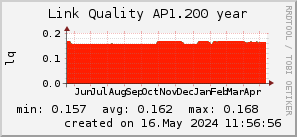
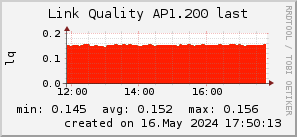
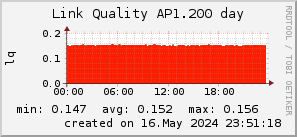
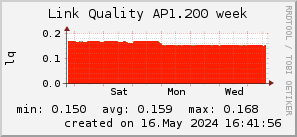
Link Qualität
http://www.on-i.de/graph/ap1.200_200x50_001eff_00ff1e_ff1e00_AREA_last.png
http://www.on-i.de/graph/ap1.200_200x50_001eff_00ff1e_ff1e00_AREA_day.png
http://www.on-i.de/graph/ap1.200_200x50_001eff_00ff1e_ff1e00_AREA_week.png
http://www.on-i.de/graph/ap1.200_200x50_001eff_00ff1e_ff1e00_AREA_month.png
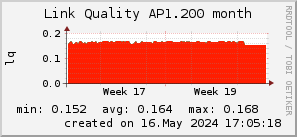
http://www.on-i.de/graph/ap1.200_200x50_001eff_00ff1e_ff1e00_AREA_year.png