Benutzer:MathiasMahnke/Luftdaten: Unterschied zwischen den Versionen
| (81 dazwischenliegende Versionen desselben Benutzers werden nicht angezeigt) | |||
| Zeile 11: | Zeile 11: | ||
* div. Kabelbinder |
* div. Kabelbinder |
||
* Fliegengitter od. ähnliches |
* Fliegengitter od. ähnliches |
||
* BME280 combined digital humidity, pressure and temperature sensor |
|||
ca. 35 EUR (2017) |
ca. 35 EUR (2017), ca. 40 EUR (2020) |
||
=== Installation === |
=== Installation === |
||
NodeMCU per USB Kabel verbinden, liefert Strom und Flash-Möglichkeit über USB-Serial. |
|||
CH34x USB Driver: |
|||
brew tap mengbo/ch340g-ch34g-ch34x-mac-os-x-driver https://github.com/mengbo/ch340g-ch34g-ch34x-mac-os-x-driver |
|||
brew cask install wch-ch34x-usb-serial-driver |
|||
CH34x USB Driver (Mac OS): <code>brew cask install wch-ch34x-usb-serial-driver</code> |
|||
Device (ggf. aufsteigende ID): |
|||
/dev/cu.wchusbserial1410 |
|||
Device (ggf. aufsteigende ID): <code>/dev/cu.wchusbserial14110</code> |
|||
Arduino IDE: |
|||
brew cask install arduino |
|||
* Menü > Einstellungen > Additional Board Manager URLs (Zusätzliche Boardverwalter-URLs) = http://arduino.esp8266.com/stable/package_esp8266com_index.json |
|||
* Menü > Werkzeuge > Bord: Arduino.. > Boardverwalter > Suche = esp8266 + "Installieren" |
|||
Weiter per Flashing-Tool: http://firmware.sensor.community/airrohr/flashing-tool/ |
|||
Luftdaten DE Firmware: |
|||
cd /tmp |
|||
[[Datei:Luftdaten Flasher2020.png|400px]] |
|||
wget https://www.madavi.de/sensor/update/data/latest_de.bin |
|||
~/Library/Arduino15/packages/esp8266/tools/esptool/0.4.9/esptool -vv -cd nodemcu \ |
|||
Anschließend per WLAN "airRohr-<id>" verbinden. Die ID wurde zuvor im Flash-Tool angezeigt. |
|||
-cb 57600 -ca 0x00000 -cp /dev/cu.wchusbserial1410 -cf latest_de.bin |
|||
Zugriff auf die initiale Konfiguration: <code>http://192.168.4.1/</code> - dort finale WLAN Einrichtung vornehmen. |
|||
Nun kann mittels Flash-Tool das Gerät im lokalen Netzwerk via IPv4 gefunden werden ("Im Netzwerk suchen"). Weitere Einrichtung dann via Webinterface unter <code>http://<ipv4-adresse></code>. |
|||
Anbindung an die grafische Auswertung via Webinterface Konfiguration > APIs: |
|||
[[Datei:Luftdaten Sensor2020.png|400px]] |
|||
Abruf nach ca. 2 Minuten unter https://luftdaten.opennet-initiative.de |
|||
Weitere Registrierung auf https://devices.sensor.community und https://opensensemap.org für die Sichtbarkeit in den zentralen Karten. |
|||
=== Verdrahtung === |
|||
* DHT22 1 - 3V |
|||
* DHT22 2 - D7 |
|||
* DHT22 4 - G |
|||
* SDS011 TX - D1 |
|||
* SDS011 RX - D2 |
|||
* SDS011 GND - G |
|||
* SDS011 5V - VU |
|||
* BME280 VIN - 3V |
|||
* BME280 GND - G |
|||
* BME280 SCL - D4 |
|||
* BME280 SDA - D3 |
|||
=== Betrieb === |
=== Betrieb === |
||
* https://luftdaten.opennet-initiative.de |
|||
* http://rostock.maps.luftdaten.info/ |
|||
* https:// |
* https://rostock.maps.sensor.community |
||
* https://app.luftdaten.info |
|||
* https://www.madavi.de/sensor/graph.php?sensor=esp8266-5478763-dht (ID = 5586) |
|||
* https://opensensemap.org |
* https://opensensemap.org |
||
* http://1.27.aps.on:81/data.json (nur innerhalb von Opennet) |
|||
Beispiele: |
|||
* https://api-rrd.madavi.de/grafana/d/q87EBfWGk/temperature-humidity-pressure?var-chipID=esp8266-5478763 |
|||
* https://api-rrd.madavi.de/grafana/d/GUaL5aZMz/pm-sensors?var-chipID=esp8266-5478763 |
|||
* https://opensensemap.org/explore/5fa7e9b667d8a1001b056958 (Kab) |
|||
* https://opensensemap.org/explore/5fa6e60b67d8a1001b969275 (Frieda23) |
|||
=== Bilder === |
=== Bilder === |
||
| Zeile 69: | Zeile 95: | ||
[Date] |
[Date] |
||
date.timezone = Europe/Berlin |
date.timezone = Europe/Berlin |
||
=== InfluxDB === |
|||
Datenbanksystem zur Speicherung der Luftdaten Zeitserien installieren: |
|||
apt install influxdb influxdb-client |
|||
Vorbereitung der Luftdaten Datenbank: |
|||
# influx |
|||
Connected to http://localhost:8086 version 1.6.4 |
|||
InfluxDB shell version: 1.6.4 |
|||
> CREATE USER luftdaten WITH PASSWORD '<password>' WITH ALL PRIVILEGES |
|||
> CREATE DATABASE luftdaten |
|||
> CREATE USER sensor WITH PASSWORD '<password>' |
|||
> GRANT WRITE ON luftdaten TO sensor |
|||
> EXIT |
|||
Erreichbarkeit des Dienstes via HTTP mit Anmeldung: |
|||
# vi /etc/influxdb/influxdb.conf |
|||
[http] |
|||
auth-enabled = true |
|||
Für den externen Zugriff ggf. Firewall Anpassung vornehmen (tcp/8086 für API). |
|||
Optional a) Umstellung auf HTTPS (Ordner und Dateirechte setzen, +xr/+x; TODO): |
|||
/etc/influxdb/influxdb.conf |
|||
https-enabled = true |
|||
https-certificate = "/var/lib/dehydrated/certs/luftdaten.opennet-initiative.de/cert.pem" |
|||
https-private-key = "/var/lib/dehydrated/certs/luftdaten.opennet-initiative.de/privkey.pem" |
|||
# influx -ssl (-unsafeSsl) |
|||
Optional b) Einbindung in HTTPS Webserver: |
|||
a2enmod substitute |
|||
/etc/apache2/sites-enabled/<site>.conf |
|||
<VirtualHost *:443> |
|||
.. |
|||
AddOutputFilterByType SUBSTITUTE application/javascript |
|||
Substitute "s?this.port=e.port||8086?this.port='80/db'?ni" |
|||
ProxyPass /db/ http://localhost:8086/ |
|||
ProxyPassReverse /db/ http://localhost:8086/ |
|||
</VirtualHost> |
|||
Senden der Daten vom Sensor: |
|||
(x) Senden an InfluxDB |
|||
(x) HTTPS |
|||
Server: luftdaten.opennet-initiative.de |
|||
Pfad: /db/write?db=luftdaten |
|||
Port: 443 |
|||
Benutzer: sensor |
|||
Password: <password> |
|||
Messung: <Ort-Name> |
|||
Luftdaten Sensor einrichten und Kontrolle: |
|||
# influx |
|||
Connected to http://localhost:8086 version 1.6.4 |
|||
InfluxDB shell version: 1.6.4 |
|||
> auth |
|||
> use luftdaten |
|||
Using database luftdaten |
|||
> show measurements |
|||
name: measurements |
|||
name |
|||
---- |
|||
<Ort-Name> |
|||
> exit |
|||
Abruf der letzten Daten: |
|||
> SELECT * FROM "<Ort-Name>" LIMIT 100' |
|||
Umzug von Daten: |
|||
> SELECT * INTO "<Ort-Name-Neu>" FROM "<Ort-Name-Alt>" GROUP BY * |
|||
> DROP MEASUREMENT "<Ort-Name-Alt>" |
|||
=== Grafana === |
|||
Externe Paketquelle als Debian APT Repository hinzufügen: |
|||
# wget -q -O - https://packages.grafana.com/gpg.key | apt-key add - |
|||
# echo "deb https://packages.grafana.com/oss/deb stable main" | sudo tee -a /etc/apt/sources.list.d/grafana.list |
|||
# apt update |
|||
Installation von Grafana und dauerhaftes Aktivieren des Server-Dienstes: |
|||
# apt install grafana |
|||
# systemctl daemon-reload && systemctl enable grafana-server.service |
|||
# systemctl start grafana-server && systemctl status grafana-server |
|||
Zugriff über http://<server-name>:3000 (admin/admin) - ggf. entsprechende Firewall-Anpassung vornehmen. |
|||
Weitere Konfiguration: |
|||
* InfluxDB Datasource anlegen, URL = https://localhost:8086/, DB = luftdaten (luftdaten/<password>), Messung = <Stadtteil-Name> |
|||
* Dashboard "3763" importieren und mit InfluxDB verbinden |
|||
Einbindung in HTTPS Webserver: |
|||
/etc/apache2/sites-enabled/<site>.conf |
|||
<VirtualHost *:443> |
|||
.. |
|||
ProxyPass / http://localhost:3000/ |
|||
</VirtualHost> |
|||
Anpassungen der Konfiguration: |
|||
/etc/grafana/grafana.in |
|||
[server] |
|||
domain = luftdaten.opennet-initiative.de |
|||
root_url = https://luftdaten.opennet-initiative.de/ |
|||
[auth.anonymous] |
|||
enabled = true |
|||
Konfiguration des Dashboards auf Basis "3763": [[Benutzer:MathiasMahnke/Luftdaten/Grafana_Dashboard]] |
|||
Image Renderer Plugin: |
|||
grafana-cli plugins install grafana-image-renderer |
|||
apt install libxdamage1 libxext6 libxi6 libxtst6 libnss3 libnss3 libcups2 libxss1 libxrandr2 libasound2 libatk1.0-0 libatk-bridge2.0-0 libpangocairo-1.0-0 libpango-1.0-0 libcairo2 libatspi2.0-0 libgtk3.0-cil libgdk3.0-cil libx11-xcb-dev |
|||
=== Sammelbestellung Sept. 2017 === |
=== Sammelbestellung Sept. 2017 === |
||
| Zeile 82: | Zeile 218: | ||
|- |
|- |
||
| Sascha S |
| Sascha S |
||
| |
| 2 |
||
| Übergeben |
|||
| Bezahlt |
|||
|- |
|- |
||
| Mathias |
| Mathias |
||
| 2 |
| 2 |
||
| Bezahlt |
| Bezahlt |
||
|- |
|||
| Opennet |
|||
| 1 |
|||
| Ausgelegt |
|||
|- |
|- |
||
| Matthias M |
| Matthias M |
||
| Zeile 99: | Zeile 231: | ||
| Oyla |
| Oyla |
||
| 1 |
| 1 |
||
| Übergeben |
|||
| Bezahlt |
|||
|- |
|- |
||
| Andreas K |
| Andreas K |
||
| 1 |
| 1 |
||
| Übergeben |
|||
| Bezahlt |
|||
|- |
|- |
||
| Ingo J |
| Ingo J |
||
| 1 |
| 1 |
||
| Übergeben |
|||
| Bezahlt |
|||
|- |
|- |
||
| Felix W |
| Felix W |
||
| 2 |
| 2 |
||
| Übergeben |
|||
| Bezahlt |
|||
|- |
|- |
||
| Dirk R |
| Dirk R |
||
| 1 |
| 1 |
||
| Übergeben |
|||
| Bezahlt |
|||
|- |
|- |
||
| Oliver F |
| Oliver F |
||
| Zeile 149: | Zeile 281: | ||
| 8 + 7 |
| 8 + 7 |
||
| 19,50 + 17,47 |
| 19,50 + 17,47 |
||
| OK |
|||
|- |
|- |
||
| USB Charger |
| USB Charger |
||
| Zeile 158: | Zeile 291: | ||
| 15 |
| 15 |
||
| 11,10 |
| 11,10 |
||
| OK |
|||
|- |
|- |
||
| USB Cable |
| USB Cable |
||
| Zeile 167: | Zeile 301: | ||
| 15 |
| 15 |
||
| 19,66 |
| 19,66 |
||
| OK |
|||
|- |
|- |
||
| Jumper Wire |
| Jumper Wire |
||
| Zeile 185: | Zeile 320: | ||
| 2 + 3*2 + 2*2 |
| 2 + 3*2 + 2*2 |
||
| 29,66 + 3*29,66 + 2*29,82 (La) + 2*29,82 (La) + 14,91 (La) |
| 29,66 + 3*29,66 + 2*29,82 (La) + 2*29,82 (La) + 14,91 (La) |
||
| OK - 8 (Ma) + |
| OK - 8 (Ma) + 6 (La) |
||
|- |
|- |
||
| DHT22 |
| DHT22 |
||
| Zeile 195: | Zeile 330: | ||
| 8 + 7 |
| 8 + 7 |
||
| 18,94 + 15,76 |
| 18,94 + 15,76 |
||
| |
|||
|- |
|- |
||
| BMP280 |
| BMP280 |
||
| Zeile 242: | Zeile 378: | ||
TODO: Fliegengitter, Kabelbinder |
TODO: Fliegengitter, Kabelbinder |
||
=== Sammelbestellung Nov. 2020 === |
|||
{| class="wikitable" |
|||
! Name |
|||
! Anzahl |
|||
! Status |
|||
|- |
|||
| Thomas S |
|||
| 1 |
|||
| Bezahlt |
|||
|- |
|||
| Mathias |
|||
| 1 |
|||
| Bezahlt |
|||
|- |
|||
! Summe |
|||
! 2 |
|||
|- |
|||
|} |
|||
Kosten aktuell bei ca. 40 EUR (Einkauf in Deutschland). Komponenten siehe 2017. Fliegengitter/Kabelbinder jeder selbst. |
|||
=== TODO === |
=== TODO === |
||
* Smartphone App |
|||
* Luftdruck per BMP280 ? |
|||
* Frieda23 BMP vs. BME (Sensemap) |
|||
=== Links === |
|||
* https://github.com/munin-monitoring/contrib/tree/master/plugins/luftdaten |
|||
* https://grafana.com/grafana/dashboards/3763 |
|||
* https://github.com/opendata-stuttgart/airrohr-firmware-flasher |
|||
Aktuelle Version vom 27. Februar 2021, 19:21 Uhr
Materialliste
- CH340 NodeMcu V3 WIFI (Basis ESP8266)
- USB EU Wall Charger Plug 5V AC
- Flat Micro Usb Cable 2.0 Data Sync Cable (2 m)
- Dupont Cable 20cm 2.54mm 1pin 1p-1p Female to Female Jumper Wire (7 Stück)
- Laser PM2.5 sensor SDS011 / particle & dust sensor
- DHT22 digital temperature and humidity sensor module (Basis AM2302)
- HT Bogen DN 75 87° (2 Stück)
- PVC Schlauch 6 mm Innen / 9 mm Außen (ca. 20 cm)
- div. Kabelbinder
- Fliegengitter od. ähnliches
- BME280 combined digital humidity, pressure and temperature sensor
ca. 35 EUR (2017), ca. 40 EUR (2020)
Installation
NodeMCU per USB Kabel verbinden, liefert Strom und Flash-Möglichkeit über USB-Serial.
CH34x USB Driver (Mac OS): brew cask install wch-ch34x-usb-serial-driver
Device (ggf. aufsteigende ID): /dev/cu.wchusbserial14110
Weiter per Flashing-Tool: http://firmware.sensor.community/airrohr/flashing-tool/

Anschließend per WLAN "airRohr-<id>" verbinden. Die ID wurde zuvor im Flash-Tool angezeigt.
Zugriff auf die initiale Konfiguration: http://192.168.4.1/ - dort finale WLAN Einrichtung vornehmen.
Nun kann mittels Flash-Tool das Gerät im lokalen Netzwerk via IPv4 gefunden werden ("Im Netzwerk suchen"). Weitere Einrichtung dann via Webinterface unter http://<ipv4-adresse>.
Anbindung an die grafische Auswertung via Webinterface Konfiguration > APIs:

Abruf nach ca. 2 Minuten unter https://luftdaten.opennet-initiative.de
Weitere Registrierung auf https://devices.sensor.community und https://opensensemap.org für die Sichtbarkeit in den zentralen Karten.
Verdrahtung
- DHT22 1 - 3V
- DHT22 2 - D7
- DHT22 4 - G
- SDS011 TX - D1
- SDS011 RX - D2
- SDS011 GND - G
- SDS011 5V - VU
- BME280 VIN - 3V
- BME280 GND - G
- BME280 SCL - D4
- BME280 SDA - D3
Betrieb
- https://luftdaten.opennet-initiative.de
- https://rostock.maps.sensor.community
- https://app.luftdaten.info
- https://opensensemap.org
Beispiele:
- https://api-rrd.madavi.de/grafana/d/q87EBfWGk/temperature-humidity-pressure?var-chipID=esp8266-5478763
- https://api-rrd.madavi.de/grafana/d/GUaL5aZMz/pm-sensors?var-chipID=esp8266-5478763
- https://opensensemap.org/explore/5fa7e9b667d8a1001b056958 (Kab)
- https://opensensemap.org/explore/5fa6e60b67d8a1001b969275 (Frieda23)
Bilder
-
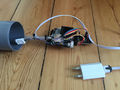 Sensorik / Arduino
 -
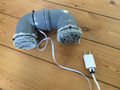 Gehäuse für Außen


API Server
PHP unter LEDE/OpenWrt installieren (ca. 1,6 MB im Flash):
opkg update
opkg install php5 php5-cgi
opkg install zoneinfo-core zoneinfo-europe
Falls in "php-cgi -m" sockets nicht enthalten ist:
opkg install php5-mod-sockets
Sowie dann sockets in /etc/php.ini aktivieren (andernfalls diesen Schritt überspringen):
extension=sockets.so
Webserver mit PHP Unterstützung, hierzu /etc/config/uhttpd erweitern:
config uhttpd 'main'
 ...
 list interpreter ".php=/usr/bin/php-cgi"
Zeitzone manuell in /etc/php.ini setzen:
[Date]
date.timezone = Europe/Berlin
InfluxDB
Datenbanksystem zur Speicherung der Luftdaten Zeitserien installieren:
apt install influxdb influxdb-client
Vorbereitung der Luftdaten Datenbank:
# influx
 Connected to http://localhost:8086 version 1.6.4
 InfluxDB shell version: 1.6.4
 > CREATE USER luftdaten WITH PASSWORD '<password>' WITH ALL PRIVILEGES
 > CREATE DATABASE luftdaten
 > CREATE USER sensor WITH PASSWORD '<password>'
 > GRANT WRITE ON luftdaten TO sensor
 > EXIT
Erreichbarkeit des Dienstes via HTTP mit Anmeldung:
# vi /etc/influxdb/influxdb.conf
 [http]
  auth-enabled = true
Für den externen Zugriff ggf. Firewall Anpassung vornehmen (tcp/8086 für API).
Optional a) Umstellung auf HTTPS (Ordner und Dateirechte setzen, +xr/+x; TODO):
/etc/influxdb/influxdb.conf
 https-enabled = true
 https-certificate = "/var/lib/dehydrated/certs/luftdaten.opennet-initiative.de/cert.pem"
 https-private-key = "/var/lib/dehydrated/certs/luftdaten.opennet-initiative.de/privkey.pem"
# influx -ssl (-unsafeSsl)
Optional b) Einbindung in HTTPS Webserver:
a2enmod substitute
/etc/apache2/sites-enabled/<site>.conf
 <VirtualHost *:443>
   ..
   AddOutputFilterByType  SUBSTITUTE application/javascript
   Substitute "s?this.port=e.port||8086?this.port='80/db'?ni"
   ProxyPass /db/ http://localhost:8086/
   ProxyPassReverse /db/ http://localhost:8086/
 </VirtualHost>
Senden der Daten vom Sensor:
(x) Senden an InfluxDB
(x) HTTPS
Server: luftdaten.opennet-initiative.de
Pfad: /db/write?db=luftdaten
Port: 443
Benutzer: sensor
Password: <password>
Messung: <Ort-Name>
Luftdaten Sensor einrichten und Kontrolle:
# influx
 Connected to http://localhost:8086 version 1.6.4
 InfluxDB shell version: 1.6.4
 > auth
 > use luftdaten
 Using database luftdaten
 > show measurements
 name: measurements
 name
 ----
 <Ort-Name>
 > exit
Abruf der letzten Daten:
> SELECT * FROM "<Ort-Name>" LIMIT 100'
Umzug von Daten:
> SELECT * INTO "<Ort-Name-Neu>" FROM "<Ort-Name-Alt>" GROUP BY *
> DROP MEASUREMENT "<Ort-Name-Alt>"
Grafana
Externe Paketquelle als Debian APT Repository hinzufügen:
# wget -q -O - https://packages.grafana.com/gpg.key | apt-key add -
# echo "deb https://packages.grafana.com/oss/deb stable main" | sudo tee -a /etc/apt/sources.list.d/grafana.list
# apt update
Installation von Grafana und dauerhaftes Aktivieren des Server-Dienstes:
# apt install grafana
# systemctl daemon-reload && systemctl enable grafana-server.service
# systemctl start grafana-server && systemctl status grafana-server
Zugriff über http://<server-name>:3000 (admin/admin) - ggf. entsprechende Firewall-Anpassung vornehmen.
Weitere Konfiguration:
- InfluxDB Datasource anlegen, URL = https://localhost:8086/, DB = luftdaten (luftdaten/<password>), Messung = <Stadtteil-Name>
- Dashboard "3763" importieren und mit InfluxDB verbinden
Einbindung in HTTPS Webserver:
/etc/apache2/sites-enabled/<site>.conf
 <VirtualHost *:443>
   ..
   ProxyPass / http://localhost:3000/
 </VirtualHost>
Anpassungen der Konfiguration:
/etc/grafana/grafana.in
  [server]
  domain = luftdaten.opennet-initiative.de
  root_url = https://luftdaten.opennet-initiative.de/
  [auth.anonymous]
  enabled = true
Konfiguration des Dashboards auf Basis "3763": Benutzer:MathiasMahnke/Luftdaten/Grafana_Dashboard
Image Renderer Plugin:
grafana-cli plugins install grafana-image-renderer
apt install libxdamage1 libxext6 libxi6 libxtst6 libnss3 libnss3 libcups2 libxss1 libxrandr2 libasound2 libatk1.0-0 libatk-bridge2.0-0 libpangocairo-1.0-0 libpango-1.0-0 libcairo2 libatspi2.0-0 libgtk3.0-cil libgdk3.0-cil libx11-xcb-dev
Sammelbestellung Sept. 2017
| Name | Anzahl | Status |
|---|---|---|
| Lars K | 3 | Bezahlt |
| Sascha S | 2 | Übergeben |
| Mathias | 2 | Bezahlt |
| Matthias M | 0 | Abgesagt |
| Oyla | 1 | Übergeben |
| Andreas K | 1 | Übergeben |
| Ingo J | 1 | Übergeben |
| Felix W | 2 | Übergeben |
| Dirk R | 1 | Übergeben |
| Oliver F | 1 | Bezahlt |
| Tom H | 1 | Bezahlt |
| Summe | 15 |
| Komponente | Anzahl | AMZN | Summe | ALI | Summe | Bestellt - Anzahl | Bestellt - Preis | Geliefert |
|---|---|---|---|---|---|---|---|---|
| CH340 | 13 | 7,49 | 104,86 | 2,27 | 31,78 | 8 + 7 | 19,50 + 17,47 | OK |
| USB Charger | 13 | 6,00 | 84,00 | 0,74 | 10,36 | 15 | 11,10 | OK |
| USB Cable | 13 | 1,62 | 22,68 | 1,11 | 15,54 | 15 | 19,66 | OK |
| Jumper Wire | 7 | 3,99 | 27,93 | 0,77 | 5,39 | 7 | 6,10 | |
| SDS011 | 13 | 41,99 | 587,86 | 14,85 | 207,9 | 2 + 3*2 + 2*2 | 29,66 + 3*29,66 + 2*29,82 (La) + 2*29,82 (La) + 14,91 (La) | OK - 8 (Ma) + 6 (La) |
| DHT22 | 13 | 4,65 | 65,10 | 1,83 | 25,62 | 8 + 7 | 18,94 + 15,76 | |
| BMP280 | 15 | 11,03 | ||||||
| HT Bogen | 26 | 1,50 | 39 | 1 (Hornbach) | 26,00 | 28 | 25,9 | OK |
| PVC Schlauch | 4 | 2,86 | 14,30 | 1,75 (Hornbach) | 8,75 | 5 | 4,75 | OK |
| Summe | 945,73 | 331,34 | 148,86 + 3*29,66 + 30,65 + 2*29,82 + 2*29,82 + 14,91 |
26,85 EUR pro Person (Stand 2017/10/08)
TODO: Fliegengitter, Kabelbinder
Sammelbestellung Nov. 2020
| Name | Anzahl | Status |
|---|---|---|
| Thomas S | 1 | Bezahlt |
| Mathias | 1 | Bezahlt |
| Summe | 2 |
Kosten aktuell bei ca. 40 EUR (Einkauf in Deutschland). Komponenten siehe 2017. Fliegengitter/Kabelbinder jeder selbst.
TODO
- Smartphone App
- Frieda23 BMP vs. BME (Sensemap)